
Finally, StarWind Virtual Storage Appliance is available on Linux allowing you to save costs on Windows licensing. Being hypervisor-agnostic, StarWind VSA easily integrates into any IT infrastructure as a fully pre-configured virtual machine ready for deployment and operation. It simply installs in any existing environment requiring no specialized SAN skills and is managed using StarWind Web console or thick client allowing to control the entire storage infrastructure from a centralized console.
Join our Tap Room Meeting on April 27 11 am PT / 2 pm ET to see all benefits of the StarWind Linux-based VSA.
Register now: https://www.starwindsoftware.com/dedicated-live-demo-session

Best posts made by Oksana
-
Meet StarWind Virtual Storage Appliance on Linuxposted in Starwind
-
Deploying a 2-node StarWind VSAN Free for VMware ESXi 6.5posted in Starwind

StarWind Virtual SAN Free allows deploying a 2-node cluster providing a highly available storage for your virtual machines to Hyper-V or ESXi hypervisor for free. When deploying multi VSAN Free nodes, the data is synchronized across the network between the nodes. StarWind VSAN Free can be deployed in a hyperconverged model where VSAN Free is installed on hypervisor nodes or in a disaggregated model with separated compute and storage resources. StarWind VSAN Free management capabilities include PowerShell, with StarWind Management console available as a 30-day trial.Read the full article by Romain Serre, a Senior Consultant at Lyon to learn how to deploy a 2-node StarWind VSAN Free for VMware ESXi 6.5 on Windows Server 2016 Core Edition.
-
StarWind brings its software defined storage to Linuxposted in Starwind

StarWind gets closer to Linux users by providing them with special Linux-based Virtual Storage Appliance version combining the underlying OS and preinstalled StarWind Virtual SAN, allowing to save money on Windows Licensing when it’s unnecessary.
StarWind VSA is compatible with any hypervisor, be it Microsoft Hyper-V, VMware ESXi, Xen or KVM and can be managed via a Web Management Console while additionally containing a StarWind vCenter plugin allowing to manage the product directly from vCenter Server.Read the full article by Vladan Seget, IT and Virtualization consultant to learn more about StarWind Virtual SAN on Linux
-
Comparing SQL Server AlwaysOn Availability Groups (AGs) and Basic Availability Groups (BAGs): Cost and Featuresposted in Starwind

AlwaysOn Basic Availability Groups (BAG) supported in SQL Server Standard Edition and AlwaysOn Availability Groups (AG) introduced in SQL Server Enterprise Edition were designed to create a replicated environment with improved failover capabilities. However, the two types provide different capabilities while also requiring different licensing costs.
Read the full article by Shashank Singh, Microsoft MVP, and SQL Server Architect to learn more about BAG and AG cost and functionality differences.
-
Migrating VMs becomes a piece of cake with a proper Virtual Machine Converterposted in Starwind

Migrating your VMs from one hypervisor to another may be quite a complicated task if there’s no decent virtual machine converter at hand. Fortunately, there are various V2V tools allowing to turn this process into a simple thing. But, when choosing a V2V converter, there are several factors you should take into consideration.Read the full article to learn how to choose a V2V converter that will become a perfect fit for your needs.
-
RE: Managing Hyper-Vposted in IT Discussion
StarWind is currently working on the new product - a flexible and customizable web-based platform which will allow users get the full control over their IT infrastructures from a single HTML5 graphical interface including S2D, Failover Clustering and Hyper-V. More information to be found in a nearby thread: https://mangolassi.it/topic/14114/help-starwind-to-pick-the-name-for-the-upcoming-product
-
Build a highly fault-tolerant IT infrastructure with StarWind HyperConverged Applianceposted in Starwind

StarWind HyperConverged Appliance utilizes Local Reconstruction Codes, Replication, and Grid Architecture to provide an ultimate fault tolerance rate while delivering sustained high performance. With StarWind HCA, the whole infrastructure remains operational even after multiple disk or node failures. In case a failure occurs, applications are automatically recovered to working cluster disks or nodes, allowing to easily withstand a failure of more than 50% of the cluster nodes.Watch our video to learn how to get uncompromised resiliency with StarWind HCA
https://www.starwindsoftware.com/get-uncompromised-fault-tolerance-of-it-infrastructure-with-starwind-hyperconverged-appliance -
Using Powershell for Hyper-V VMs Automatic Deployment in Windows Server 2016posted in Starwind
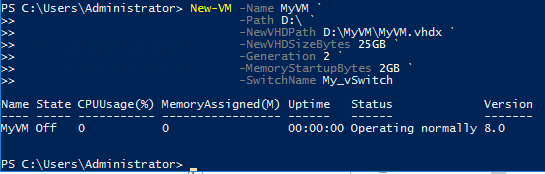
With PowerShell, automatic deployment of Hyper-V VMs in Windows Server 2016 becomes a piece of cake
No doubts, commercial software for automatic VM deployment is great, but it may be too expensive comparing to the goals that need to be achieved. That’s where PowerShell kicks in. With PowerShell commands, the creation and configuration of Hyper-V virtual machines in Windows Server 2016 become a fairly simple thing. But, what is more important, you can create a script which deploys VMs of the same configuration automatically.Read the full article by Boris Yurchenko, a Support Engineer at StarWind, to learn how to automate your VMs deployment with PowerShell in Windows Server 2016.
-
S stands for security. Find out which certificate ensures the connection safety.posted in Starwind
Installing an HTTPS certificate is just a tip of the iceberg. This certificate has a huge number of options that usually are hidden deep inside config files. Actually, these tiny details allow distinguishing a site that can be rendered vulnerable via HTTPS downgrade attack and the one that is really secure.Read the full article by Gary Williams, a virtualization, storage, and Windows systems administrator, to achieve the highest security.
-
StarWind reveals new backup storage technology at Storage Field Day 15posted in News
StarWind team will take the floor at Storage Field Day 15 to reveal new awesome backup storage technologies: Virtual Tape Library with Cloud and Object storage and backed by ProActive Support! Our speaking slot is the first in line: March 9, 8-10 am PT, don’t miss it!For Livestream, go to https://www.facebook.com/TechFieldDay/ or watch on http://techfieldday.com/, Livestream.com - includes the entire event.


Latest posts made by Oksana
-
Turning Virtualization Costs into Measurable Metricsposted in Starwind

Virtualization expenses extend beyond initial hardware and licensing. Ongoing operations, backup requirements, renewals, and upgrade cycles all contribute to the total cost over a 3–7 year period.
Our latest guide by Ivan Ishchenko for StarWind outlines how to structure those elements into a clear TCO model. Read more here: https://starwind.com/s/148 -
StarWind Success Story: Build an easy-to-manage IT infrastructure with StarWindposted in Starwind

De La Salle Santiago Zobel School, a provider of basic education in southern Metro Manila, faced high licensing and support costs with its Nutanix AHV cluster while being restricted to specific hardware. The school needed a cost-effective, flexible, and easy-to-manage IT infrastructure that could run on commodity hardware. By deploying StarWind Virtual HCI Appliance (VHCI), De La Salle Santiago Zobel School achieves high performance, reduces costs by about $50,000, and simplifies IT management. Read more here: https://starwind.com/s/145
-
Step-by-Step: Add RDM Disks to Your vSphere VMposted in Starwind

Raw device mapping is still useful when you want direct LUN access from a VM, keep storage workflows on the array, or need physical mode behavior for specific workloads.
Our new article by Alex Bykovskyi for StarWind explains what RDM is, the difference between virtual and physical compatibility modes, how to present LUNs to ESXi hosts, and how to attach an RDM disk to a VM step by step. Read more here: https://starwind.com/s/142 -
Live System Mode: Your Emergency Tool for Veeam Repositoriesposted in Starwind

If your #Hardened Repository is approaching capacity, knowing this procedure can save your Backup Strategy. Our new step-by-step guide by Paolo Valsecchi, a System Engineer, for StarWind details how to boot from the Veeam ISO, mount the data volume, handle immutable files correctly, and restore repository operations without compromising security controls. Read more here: https://starwind.com/s/13z
-
StarWind Success Story: Build an easily managed IT infrastructure with StarWindposted in Starwind

Crawford County R-1 School District, an educational institution in Missouri, had standalone Hyper-V servers that lacked redundancy and scalability and were difficult for a one-person IT department to manage. The district needed a simple, cost-effective, and fully supported high-availability solution that would eliminate downtime risks without adding staff or complexity. By deploying StarWind Virtual HCI Appliance (VHCI), Crawford County R-1 School District builds a highly available and easily managed IT infrastructure, ensuring reliable system performance and reducing administrative workload for its one-person IT department. Read more here: https://starwind.com/s/13w
-
Snapshots Are Not Backupsposted in Starwind

Snapshots and checkpoints are excellent for short-term rollbacks before risky changes. What they are not is a replacement for proper backups.
Our latest article by Vladyslav Savchenko for StarWind explains why snapshots fail when storage systems, accounts, or security boundaries fail, and what real Data Protection requires instead. Read more here: https://starwind.com/s/13t -
StarWind Success Story: Deploy a high-availability cluster with StarWind VSANposted in Starwind

Deans Computer Services, an England-based IT support provider, relied on a standalone Hyper-V setup with no redundancy, creating a single point of failure for critical workloads. The company required a high-availability (HA) cluster that could be built on its existing hardware without relying on traditional shared storage. By deploying StarWind Virtual SAN (VSAN), Deans Computer Services repurposes its servers into an HA cluster, eliminates the single point of failure, and reduces costs, ensuring continuous service delivery to its clients. Read more here: https://starwind.com/s/13q
-
Scale-Up vs. Scale-Out: Which Model Fits Your Infrastructure?posted in Starwind

Adding power to a single server or expanding with multiple nodes leads to very different outcomes.
Our new article by Ivan Ishchenko for StarWind explains the differences between Scale-Out and Scale-Up and shows when each approach makes sense in modern virtualized and cloud environments. Read more here: https://starwind.com/s/13n -
Native NVMe Comes to Windows Server 2025posted in Starwind

Windows Server 2025 introduces native NVMe support, removing the long-standing SCSI translation layer.
In our new article by Marius Sandbu, a cloud-native and end-user computing expert, for StarWind, we explain what has changed in the Windows storage stack, how to enable the new NVMe driver, and the impact it can have on workloads like Storage Spaces Direct and SQL Server. Read more here: https://starwind.com/s/13k -
StarWind Success Story: Deploy a high-availability cluster with StarWind VSANposted in Starwind

Ascent, LLC, a U.S.-based provider of mission-critical infrastructure services, relied on two standalone servers with no high availability (HA), requiring manual workload shifts and planned outages for maintenance, which put uptime at constant risk. The company needed an easy, affordable way to achieve HA and maintenance flexibility, using only two existing nodes. By deploying StarWind Virtual SAN (VSAN), Ascent, LLC adds seamless HA and failover to its two-node Windows Server environment and ensures uninterrupted operations, simplified maintenance, and stronger service continuity for its clients. Read more here: https://starwind.com/s/13h